• Docs
  • Tools
  • Blog
  • Changelog
    • Download and Installation
    • Basic Settings
    • Keyboard Shortcuts
    • Mode Settings
    • Sound Settings
    • Enable Bilingual Subtitles
    • Modes Usage Guide
    • Subtitle Operations
    • Word Collection and Export
    • Disable the Extension
    • Translation Settings
    • Reading Mode
    • AI Model Application Guide
    • Self-Hosted Local LLM with Ollama
    • Learn from TED Talks
    • Full-Article Learning Mode
    • Translation API Application Guide
    • OCR Translation Usage Guide
    • Dictation Mode
    • AI Conversation Practice
    • SRS Spaced Repetition
    • Anki Card Import / Export
    • AI Translation Engine Configuration
    • Learning Center Dashboard

Subtitle Operations

How to switch video subtitles and download subtitle files.

Switching Subtitles

If the current video has multiple subtitle tracks, use the subtitle switch button to switch between them.

Switching subtitles

Downloading Subtitles

First select the subtitle you want, then click the download button.
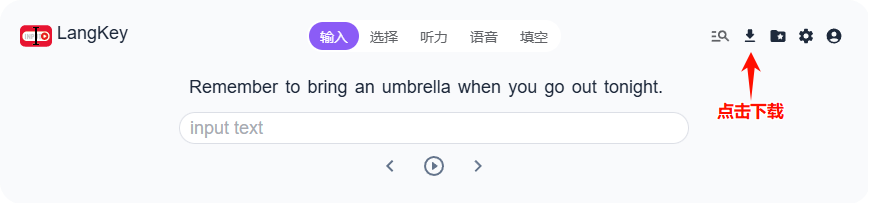
Downloading subtitles

Modes Usage Guide

How to use each learning mode, with tips and caveats.

Word Collection and Export

Save frequently used words and export them to an Excel file for further study.

On this page

  • Switching Subtitles
  • Downloading Subtitles

Product

  • Features
  • 7 Practice Modes
  • Vocabulary / SRS
  • Learning Center
  • Changelog

Resources

  • Docs
  • Blog
  • Tools
  • FAQ
  • Product Roadmap

Company

  • About
  • Contact
  • Terms of Service
  • Privacy Policy

Community

  • GitHub
  • X (Twitter)
  • Discord

©2025- 2026 • LangKey. All rights reserved.