Mode Settings
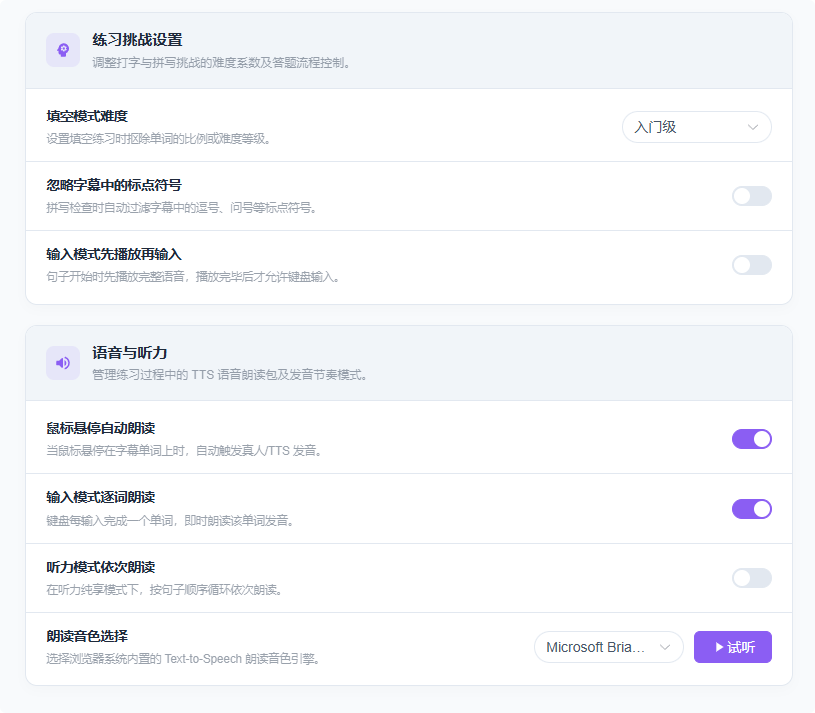
Cloze Mode Difficulty
AI cloze mode offers three difficulty levels for different learning stages:
- Beginner: Basic common vocabulary
- Proficient: Everyday core vocabulary
- Expert: Professional and rare vocabulary
Ignore Punctuation in Subtitles
When enabled, input mode passes validation without requiring punctuation (subtitles still display punctuation normally).
Play Before Input (Input Mode)
By default you type the subtitle first, then the video plays. Enable this option to listen to the original audio first, then type — ideal for preview practice.
Hover to Auto-Read
In AI cloze mode and selection mode, hover over a word to automatically play its pronunciation.
Read Word by Word (Input Mode)
When enabled, input mode reads each word aloud, so you can hear the correct pronunciation of every word as you type — a great way to get familiar with how words sound.
Read Sentence by Sentence (Listening Mode)
Listening mode reads each sentence aloud, helping you clearly hear every word during dictation. Very useful for listening training.
Voice Selection
Be sure to pick a voice that matches the language of the subtitles you're studying; otherwise pronunciation may fail or sound off.