OCR Translation Usage Guide
How to use OCR to recognize and capture subtitles when a video has none.
Limitations of OCR: Recognition accuracy depends on video resolution, background complexity, and other factors. Not all subtitles are guaranteed to be recognized.
How It Works
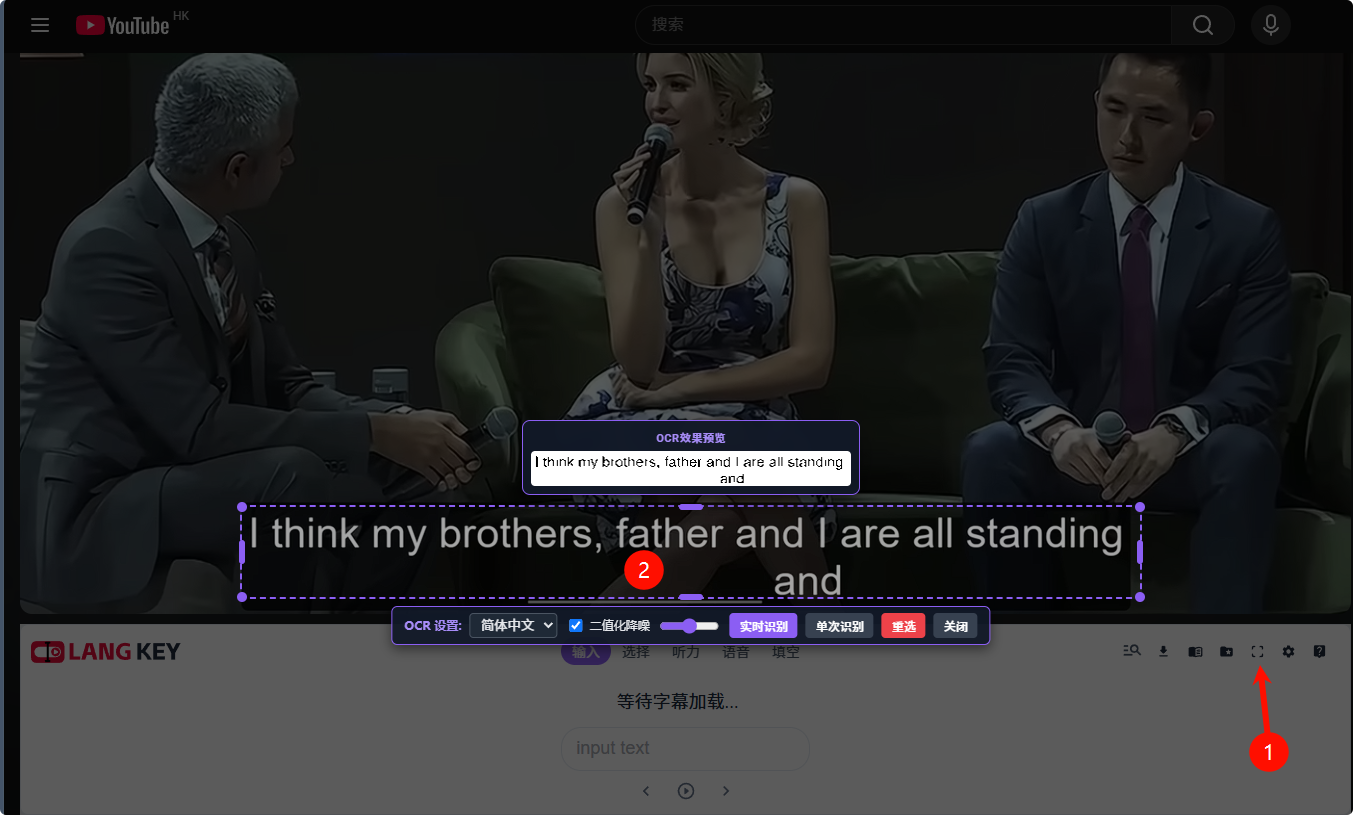
When the extension detects that the current video has no subtitles, an OCR icon appears in the top-right corner of the extension. Click it, then draw a box around the subtitle area in the video to recognize it.
OCR Settings
- Recognition language: Chinese, Japanese, Korean, and English are currently supported.
- Binarization denoising: When the video background is busy, enabling this improves recognition accuracy.
- Real-time recognition: When enabled, the extension continuously recognizes subtitles in the video and shows them in the subtitle bar.
Live Preview
With binarization denoising enabled, you can adjust the parameters and preview the recognition result in real time to find the best settings.